How I Built a Fee Ledger for an Online Quran Academy
How I built an online Quran academy fee management system that survives advance payments, siblings paid together, multiple currencies and admin overrides, with a full audit trail.
- Laravel
- Vue
- Billing
- Data Modelling
- MySQL
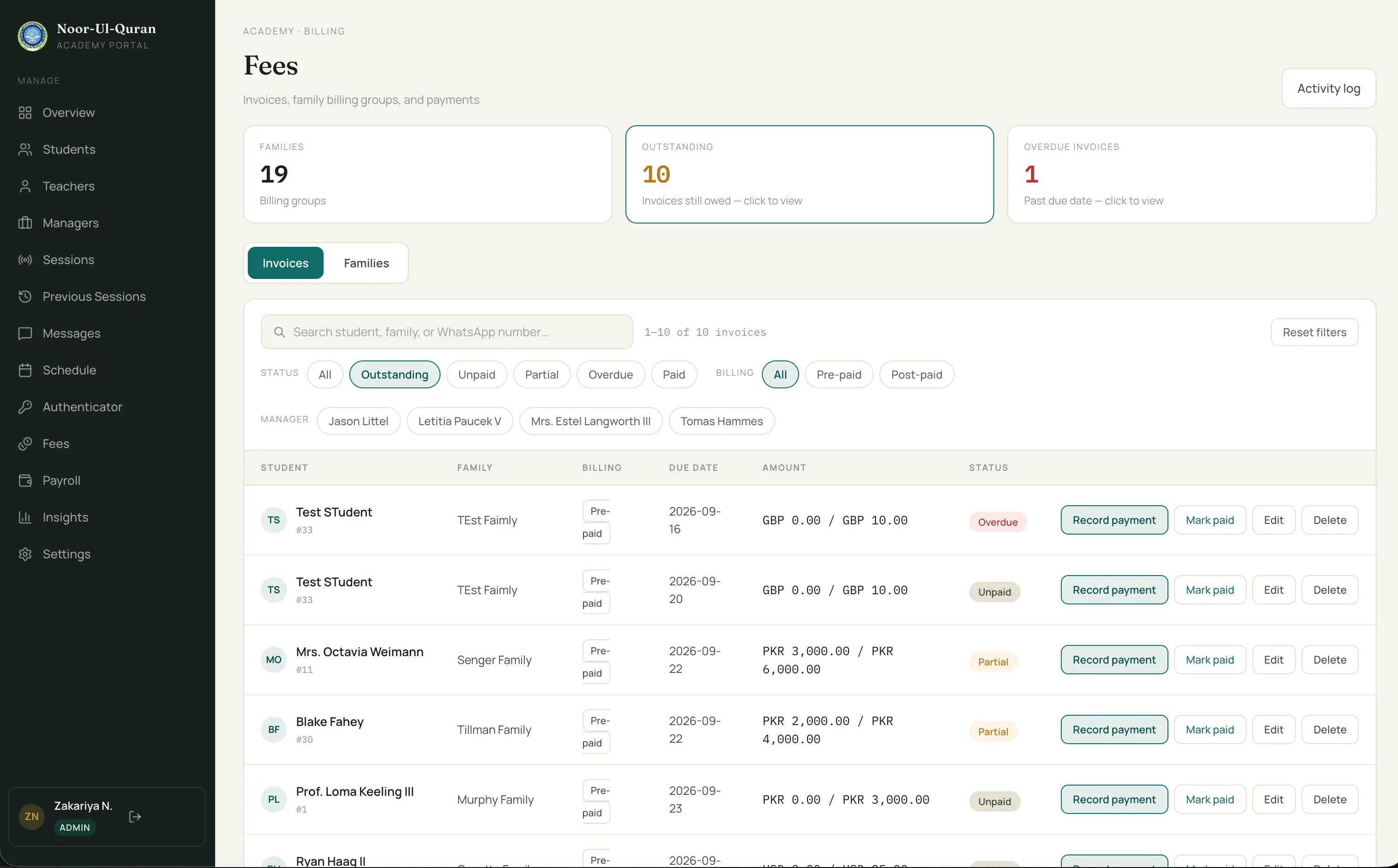
I built an online Quran academy fee management system, and the first version had one rule: a student has an invoice, and the invoice is paid or unpaid. It’s the model every tutorial teaches.
Then real families showed up. They paid before any invoice existed. They sent one transfer for several children. They paid in a different currency from the one they were billed in. And admins sometimes wanted to close an invoice by judgment, even when the numbers didn’t reconcile exactly.
None of that fits in a paid/unpaid flag. This post is about the ledger I built instead, and the mistakes I made on the way there.
The problem
Five things real families do
The product is Quran Academy Portal, a Laravel and Inertia/Vue monolith for running live online Quran classes. It has teachers, students, families, admins and managers. The fee module is one part of it, and it’s the part where being wrong costs someone money. Other online Quran work of mine, like the Quran Verse Pro tutoring platform, is on my projects page.
Advance payments. Money arrives before any invoice exists.
Partial and shared payments. A part-payment, or one transfer that covers several children.
Another currency. The family pays in a different currency from the one they’re billed in.
Discounts and waivers. They reduce what’s owed, but must not erase the original amount.
Admin judgment. Sometimes an admin wants to close an invoice even though the numbers don’t reconcile exactly.
Every one of these breaks “invoice is paid or unpaid”. They stop being special cases once you ask a different question. Not which student paid, but which family sent money and which invoices it covers.
The data model
Five tables behind an online Quran academy fee management system
Money flows from a payment, through an allocation, onto an invoice. Adjustments change what an invoice is worth. Everything gets logged. Together, those tables are the Quran academy fee ledger.
- invoices
- Per student. Carries a denormalised
family_idso family-wide balance queries avoid joins. Holdsamount,currency, a cachedamount_paid, a cachedstatus(unpaid, partial, paid, overdue), plusstatus_lockedandstatus_note. Soft deleted. - payments
- Belong to a family, not a student.
amount,currency,paid_on,recorded_by_user_id. - payment_allocations
- The join that makes it work. One payment can fund many invoices, and one invoice can be funded by many payments. Unique on
(payment_id, invoice_id). A nullableinvoice_currency_amountis used only for cross-currency allocations. - invoice_adjustments
- Discount, waiver, write_off, correction. A positive amount reduces what’s owed. A negative one increases it.
- financial_activity_logs
- A before/after JSON snapshot for every money action.
Design decisions
How the fee management system works
Eight decisions shape this Laravel fee management system, from who owns a payment to how the database stops duplicate invoices. Each gets its own short section below.
Decision 01 · Ownership
Payments belong to families, invoices belong to students
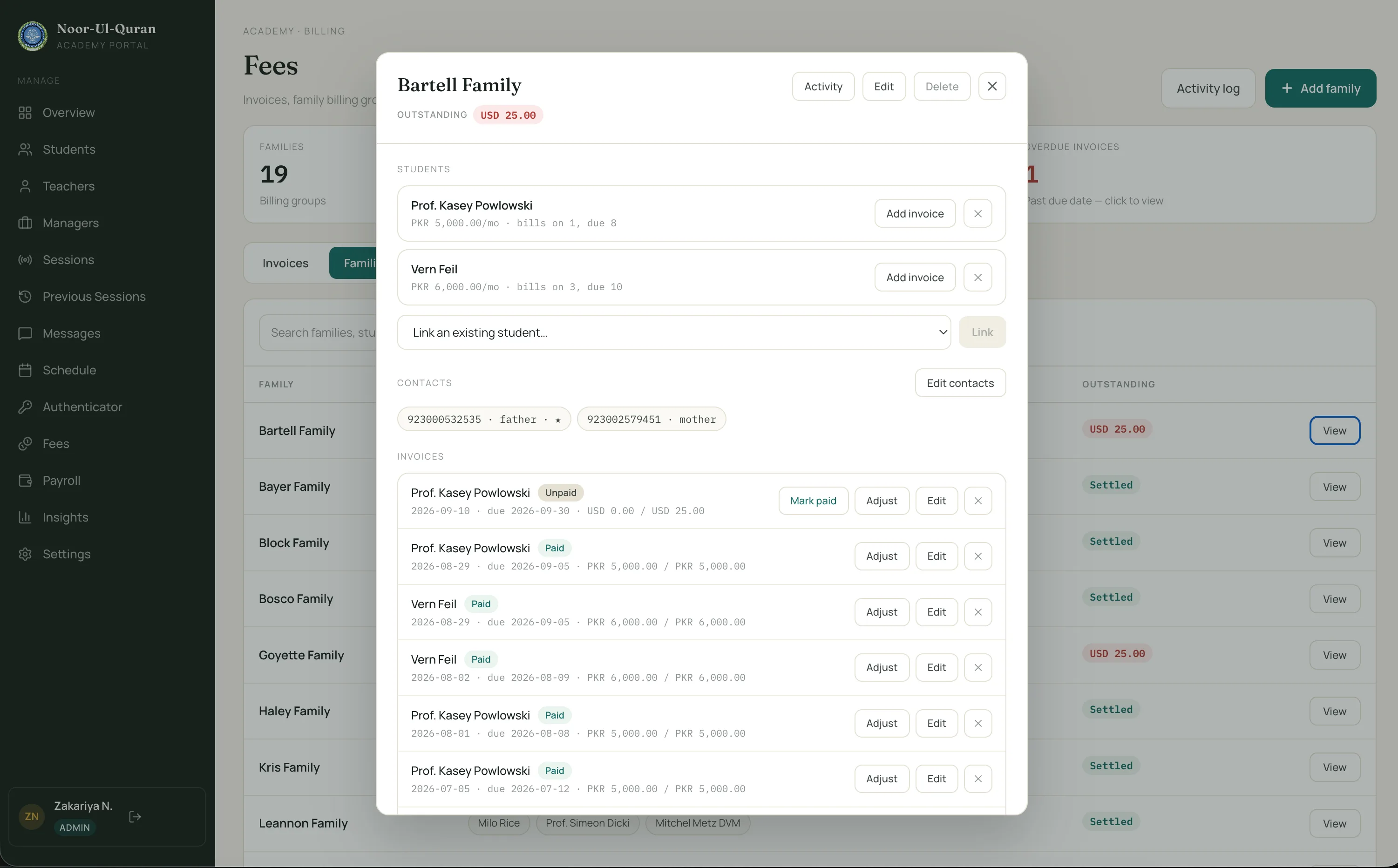
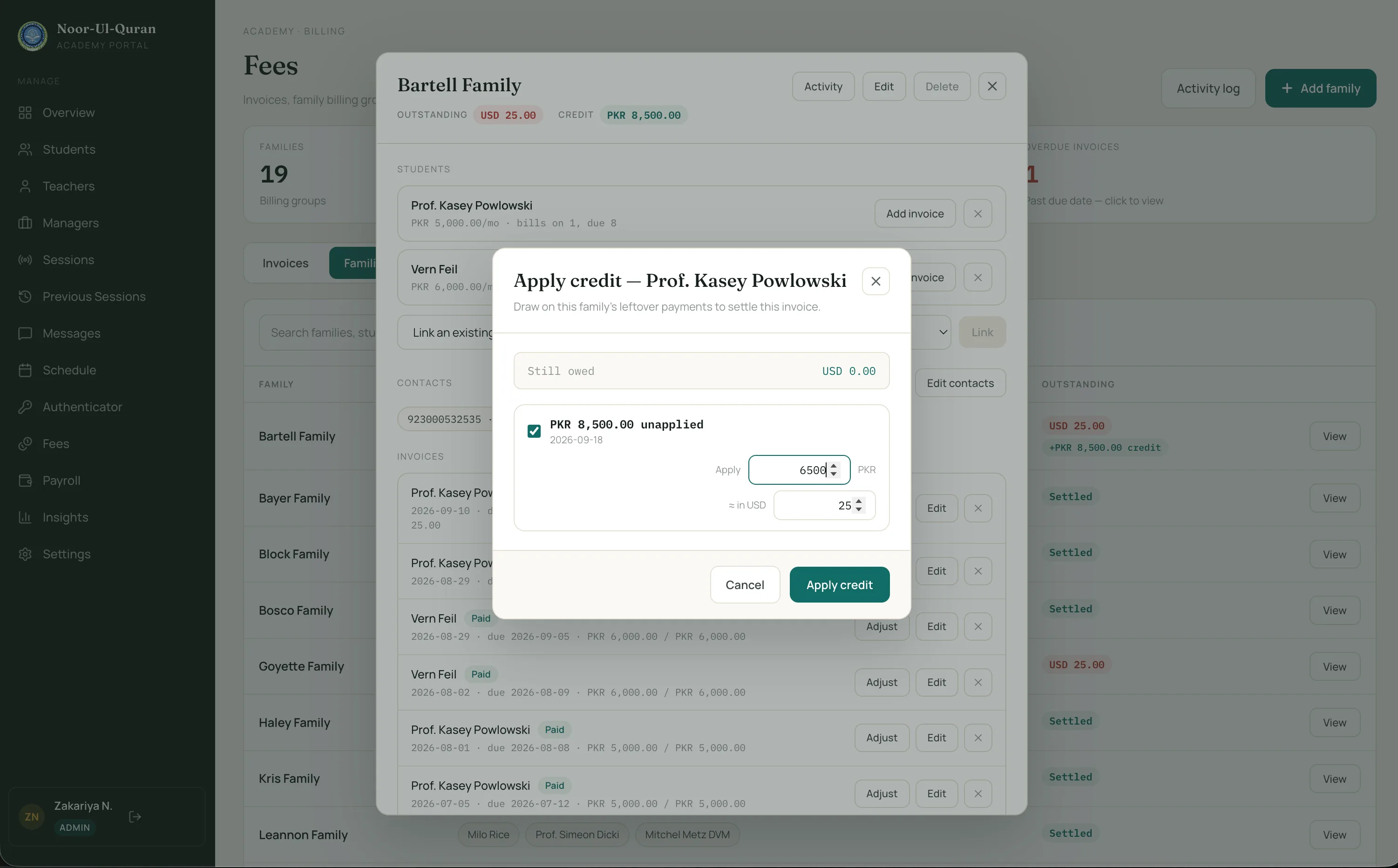
A payment is money a family sent. It doesn’t know which child it’s for until someone allocates it. That one choice handles siblings paid together and partial payments with no special code.
Whatever part of a payment is unallocated is the family’s credit. When a new invoice is created, it sweeps that credit automatically, oldest payment first. Advance payments work the same way: the payment waits until an invoice exists.
Decision 02 · Adjustments
Adjustments never touch the original amount
An invoice’s amount is what I billed, and it never changes. Discounts, waivers, write-offs and corrections are rows in invoice_adjustments. A positive amount reduces what’s owed. A negative one increases it.
The net is derived every time: netAmount() = amount - sum(adjustments). It is never stored. A waiver shows up as a waiver, and the original figure stays on record for anyone who asks what the family was first charged.
Decision 03 · Currency
Cross-currency without an exchange rate
Auto-sweep only happens when the payment and the invoice are in the same currency. When they differ, an admin enters the invoice-currency equivalent by hand, once per allocation. It’s stored in invoice_currency_amount.
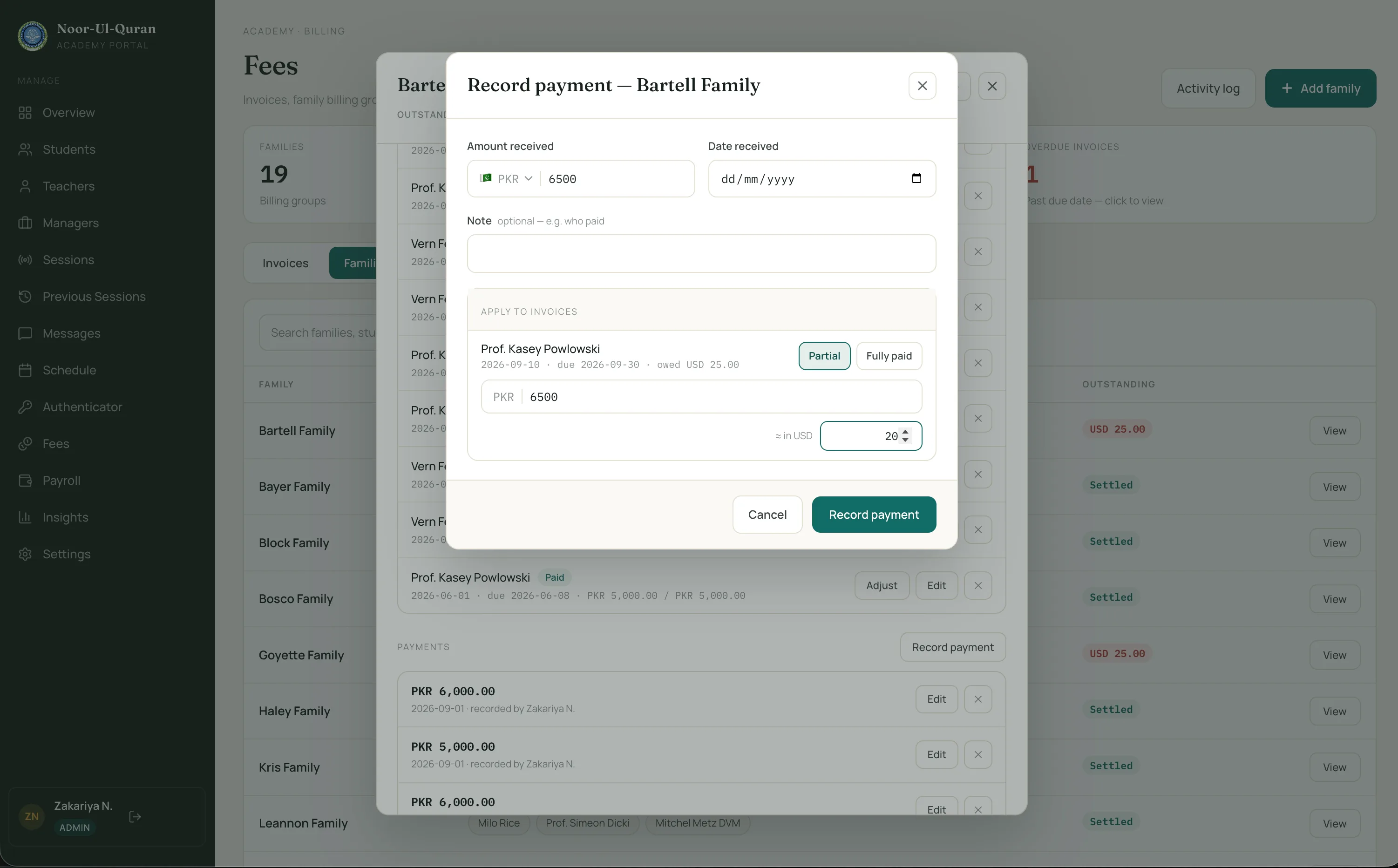
Why not convert automatically? There is no trustworthy stored rate to convert with. Any rate I picked would be a guess, and a guess on money is worse than asking a human.
The manual figure is also a record of what was actually applied. An invoice’s paid total sums COALESCE(invoice_currency_amount, amount), so same-currency allocations need no extra work.
Decision 04 · Closing invoices
“Mark as paid” records a real payment
Admins need a way to close an invoice. The lazy version sets status = 'paid' and moves on.
That leaves the invoice showing Paid with 0.00 collected. The payment history is empty, and any revenue report disagrees with the badge.
So markInvoicePaid() creates a payment for exactly the remaining balance, in the invoice’s currency, and allocates it to that invoice.
// markInvoicePaid(): a real payment, not a label flip
$remaining = bcsub($invoice->netAmount(), (string) $invoice->amount_paid, 2);

$this->recordPayment($invoice->family, [
    'amount'   => $remaining,
    'currency' => $invoice->currency,
    'paid_on'  => now(),
    'note'     => $note,
], [ $invoice->id => ['amount' => $remaining] ], $actor);
Now amount_paid, the payment history and any revenue report agree with the badge. The override shows up as money, and it goes through the same path as every other payment, so the audit trail covers it.
Decision 05 · Status
Status is a cache, and two things keep it honest
The invoice stores a status, but allocations are the truth. refreshStatus() recomputes it every time an allocation or an adjustment changes.
// Invoice::refreshStatus() — status derived from allocations, unless locked
$paid = (float) $this->allocations()
    ->sum(DB::raw('COALESCE(invoice_currency_amount, amount)'));
$netAmount = (float) $this->netAmount();

$attributes = ['amount_paid' => $paid];

if (! $this->status_locked) {
    $attributes['status'] = match (true) {
        $paid >= $netAmount        => 'paid',
        $this->due_date?->isPast() => 'overdue',
        $paid > 0                  => 'partial',
        default                    => 'unpaid',
    };
}

$this->forceFill($attributes)->save();
Some invoices become overdue with nobody touching them, so nothing calls refreshStatus(). A daily fee:sweep-overdue cron picks those up. That’s the second mechanism.
Overriding the status
Sometimes an admin wants to close an invoice on judgment. Setting status_locked makes refreshStatus() still recompute amount_paid for display, but leave status alone. There’s a status_note for the reason, and passing “auto” releases the lock.
The override is logged as invoice.status_overridden, so it’s never a silent edit.
Decision 06 · Recurring invoices
Recurring invoices follow the admin’s first invoice
The first invoice an admin creates for a student sets that student’s billing_day and due_day. The fee:generate-invoices cron follows that pattern from then on.
Two date details matter. It uses Carbon’s addMonthNoOverflow(), so a billing day of the 31st doesn’t skip a month. Plain month addition from 31 January lands in March, and February never gets an invoice. It also clamps the due day to the month’s real length.
It supports two shapes. Pre-paid invoices are due on or after the billing day in the same month. Post-paid invoices roll the due date to the next month.
Decision 07 · Concurrency
Stopping duplicate invoices in MySQL
Two concurrent requests can create the same invoice. An app-level exists() check can’t stop that, because both requests run the check before either one inserts.
The obvious fix is unique(student_id, billing_date). It breaks soft deletes: once an invoice is soft deleted, you can’t re-create it for that student and date.
My fix is a stored generated column that is NULL for soft-deleted rows, with the unique index on that column. MySQL unique indexes ignore NULLs, so deleted rows drop out of the constraint.
-- Unique per student+date, but soft-deleted rows opt out
ALTER TABLE invoices
  ADD COLUMN billing_date_if_active DATE
  GENERATED ALWAYS AS (IF(deleted_at IS NULL, billing_date, NULL)) STORED;

ALTER TABLE invoices
  ADD CONSTRAINT invoices_student_billing_date_unique
  UNIQUE (student_id, billing_date_if_active);
The database now guarantees it. The exists() check is still useful for a friendly error message, but it’s no longer what keeps the data correct.
Decision 08 · Audit trail
Every money action leaves a snapshot
Every mutation writes a row to financial_activity_logs with a before and after JSON snapshot. The actions are named: invoice.created, payment.updated, invoice.credit_applied, invoice.status_overridden, and so on.
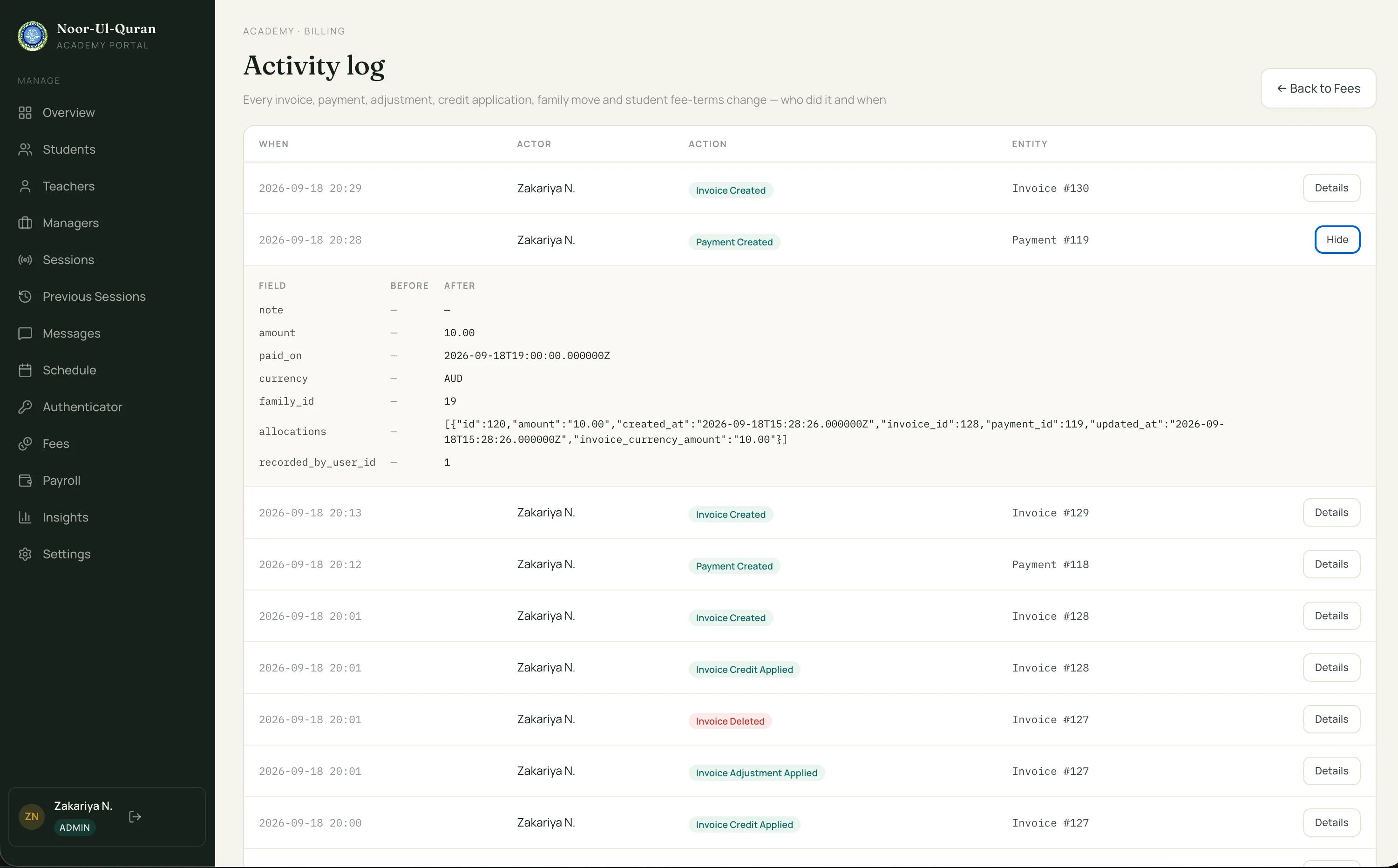
A null actor means the cron did it, so automation is easy to tell apart from a person. The admin UI has an activity log page.
When someone asks why a family’s balance looks wrong, the answer is in the rows rather than in anyone’s memory.
What broke along the way
The commit history is not flattering
The module is about 4,400 lines across Laravel and Vue, built over 40+ commits. I’d like to say I drew the design on paper first. The history says otherwise. “fee module in-progress” appears many times. Then “refactored” appears three times.
Those three refactors had one thing in common. In the early shape, status was the truth and everything else tried to agree with it. Every code path that touched money had to remember to keep the status right.
The fix was to flip it. Allocations are the truth. Status is a cache computed from them, kept honest by refreshStatus() and the daily sweep.
I’m glad the module has 35+ feature tests. Refactoring money code three times without them would have been guesswork.
What I’d do differently
A candid postmortem
I reviewed the module before writing this and found six weaknesses. Here they are, with where each one stands.
- 1NEXT UP
Due today is overdue in one place and not in another
refreshStatus()treats an invoice due today as overdue, becauseisPast()on a midnight date is already true. Thefee:sweep-overduecron only flips invoices due strictly before today. So the status you see depends on which code path touched the invoice last.Next on my list: Pick one definition of overdue and use it in both places.
- 2NEXT UP
Credit application isn’t locked
The unallocated-balance check and the allocation insert aren’t wrapped in
lockForUpdate. Two admins applying the same credit at the same moment could over-allocate it.Next on my list: Wrap the check and the insert in one transaction that locks the payment row.
- 3NEXT UP
No cap on the invoice side
Allocations are checked against the payment amount, but not against the invoice’s remaining balance. An invoice can be overpaid.
Next on my list: Check the invoice’s remaining balance as well, inside the same lock.
- 4NEXT UP
Mixed money math
Most of the module uses
bcaddandbcsub. ButrefreshStatus()and the allocation checks cast to(float), as the snippet earlier shows. Money should use one exact approach throughout.Next on my list: Move everything to bcmath, or to integer minor units, and remove the casts.
- 5NEXT UP
The audit log is written after commit
The log entry is written after the database transaction commits. If logging fails, a money change exists with no record of it.
Next on my list: Write the log inside the transaction, so both succeed or neither does.
- 6INTENTIONAL
Partially paid and past due shows “overdue”
A partially paid invoice past its due date shows “overdue” rather than “partial”. That can look like a bug. It’s deliberate.
The trade-off: Overdue is the more actionable state for an admin, because it says someone needs to chase. The cost is that “partial” disappears once the due date passes, though
amount_paidstill shows what has come in.
Takeaways
What you can reuse
Attach money to whoever paid and obligations to whoever owes. Join them with an allocation table, and siblings, partial payments and advance payments stop being special cases.
Derive, don’t overwrite. Keep the original amount, store adjustments as rows, and compute the net. If you cache status, make allocations the truth and refresh the cache from them.
If you can’t trust an exchange rate, don’t guess one. Ask a human for the number and store it next to the record.
“Mark as paid” should write a real payment. Then the badge, the history and the revenue report can’t disagree.
Enforce uniqueness in the database, soft-deleted rows included. A generated column that is NULL for deleted rows does it in two statements.
More write-ups from production projects live on the blog. If you’re planning something similar, you can book a call and we can talk through your data model.
FAQ
Common questions
How do you handle advance payments in a fee management system?
Record the payment against the family, not a student. Until an invoice exists, the payment has nothing to fund, so it sits there as unallocated family credit. When a new invoice is created, it sweeps that credit automatically, oldest payment first. The same allocation model handles partial payments and advance payments with no special case.
How do you handle multi-currency fees without an exchange rate?
For multi-currency invoicing in Laravel, auto-sweep only happens when the payment and the invoice share a currency. When they differ, an admin enters the invoice-currency equivalent by hand for each allocation. There is no trustworthy stored rate, and a guess on money is worse than asking a human.
Should invoices belong to students or families?
Invoices belong to students. Payments belong to families, because one transfer can cover several children and one invoice can be paid in several parts. A payment_allocations table joins the two, and any unallocated payment amount becomes family credit. Invoices also carry a denormalised family_id so family-wide balance queries avoid joins.